beyond logging
July 17, 2019
while console.log() is ubiquitous, console.table() and console.dir() have their well documented uses, this article will talk about a few of the lesser known features on the console object.
console.trace()
console.trace() outputs a stack trace to console, letting you know which and what order execution contexts were created. Small codebases might not see this method as incredibly useful, but for larger applications, where a particular method may be called by several other methods, this will be useful learning what functions preceeded the call to the target execution context.
const first = function() {
  second()
}

const second = function() {
  third()
}

const third = function() {
  console.trace()
}

first()
This will output the ordered execution contexts and the corresponding file and line numbers of the function definitions.
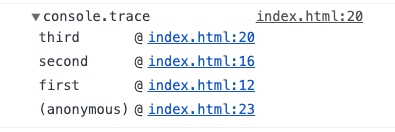
If you employ several traces in development, you can feed a name string as an argument console.trace('This Trace') to keep them separate.
console.group()
I have been in many situations where I need to log several different elements, often related, and if I don’t do string concatention or somehow else label each log, my debugging process slows down because I simply don’t understand where each line is coming from and there is just too much going on.
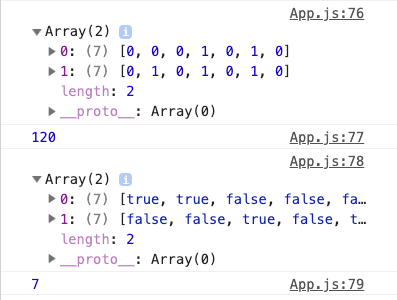
This is a log of parts of the state on mounting from my step sequencer application - it’s a mess and uninformative.
With console.group() I can organize the logs a little bit better through grouping related data. This method also has sibling methods console.groupEnd() and console.groupCollapsed() which aid in formatting the logs. I used all three to make my logging clearer (I could label the arrays to make it even clearer) along with a couple other console methods.
console.group("componentDidMount")

console.group("sequencer data")
console.table(this.state.checked)
console.table(this.state.isActive)
console.log("sequence length: " + this.state.sequenceLength)
console.groupEnd()

console.group("tempo")
console.log(this.state.tempo)
console.groupEnd()

console.groupCollapsed("state")
console.log(this.state)
console.groupEnd()

console.groupEnd() // ends 'componentDidMount' group
The console ends up looking better, easier to read, and eliminates a lot of “What is that and where did it come from?” questions.
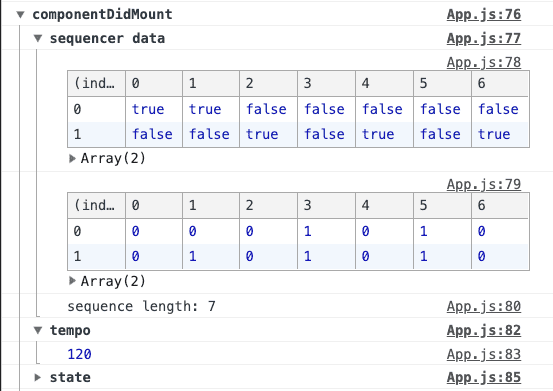
This is more code to write than the first example of a mess, but I spend less time trying to decipher unlabeled logs in the console later. One could abstract this code into a snapshot() method and reuse it as necessary.
console.count()
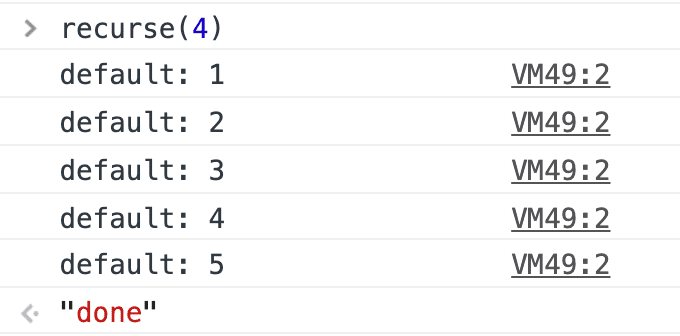
I sometimes naively use a console.log('here') to mark if I have entered a particular conditional or have called a certain method. It’s okay if you intend for it to happen once, but if you are trying to measure any sort of iteration, there is a more descriptive way of logging hits at points in code using console.count(). This method keeps track of how many times it has been called and outputs the number to the console - a great tool if you want to measure how many times a recursive function will call itself.
function recurse(number) {
  console.count();
  if (number === 0) return 'done';
  return recurse(number - 1);
}

recurse(4);
The function recurse() will call itself and decrement it’s original argument by one until it hits 0 and return the string ‘done’. In the console, you can see that the function had been called a total of five times.
styling logs
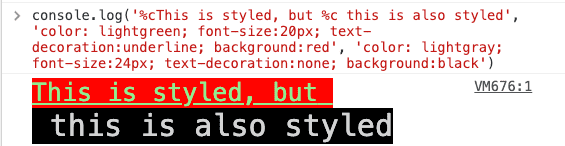
Though this article was meant to be about other methods than console.log(), I think it is important to know that developers can style logs using CSS key-value pairs. A developer just has to write %c before the logged content to be styled.

It is possible to add multiple styles to the same log to differentiate certain parts. This may help if you need to highlight the difference between a label and a value.
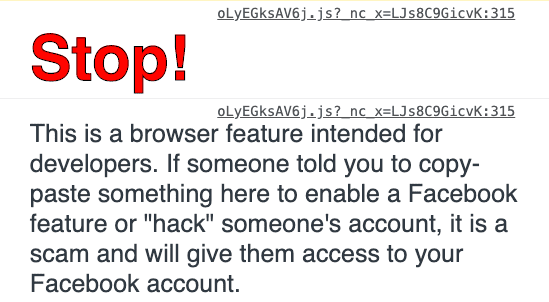
Styling logs could be useful not only for a develop environment for others, making the logs more readable, but also for consumers of technology like when Facebook warns somebody who visits their page and spins up the console.
there are a few more methods that may eventually find their way into this post (.profile() and .assert() among others), but check out MDN’s page on the console object to see the full gambit.

Sam Parsons is currently a Software Engineer at Codesmith. He is also a contributor to Swell, an API development tool for streaming technologies (HTTP2, WS, SSE).